Blog Kabar Berita Nasional dan Internasional: Computers
Showing posts with label Computers. Show all posts

Sunday, March 13, 2011

The PlayStation 2 games will appear in the Android platform

Good news for gaming enthusiasts. An official report Eurogamer, citing information from the video component of a computer company NVIDIA says the PlayStation 2 games will appear in the Android platform.

Call it the games like Winning Eleven, Guitar Hero II, Final Fantasy, Resident Evil 4, Gran Turismo, Metal Gear Solid 3, God of War, to the Grand Theft Auto (GTA) could be will appear on your Android device screen, whether mobile phones and tablet PCs.


Apparently, NVIDIA recently update the application Tegra Zone to allow the emergence of PS 2 games on the Sony PlayStation Suite, which is a platform that provides a catalog of old games on the PlayStation to be played on their Android devices.

NVIDIA is the latest update also marks that the device is equipped with Tegra would be considered "certified" and can work with PS Suite. This service will run first on PlayStation phone made ??by Sony Ericsson, Xperia Play.

In addition, NVIDIA also mentions that the games PlayStatin 2 will be circulated through the PlayStation Suite. However, according to Engadget, though could be wrong, until now there is no Android devices capable of running PS2 games.

That is, you have to wait until level quad-core processor embedded in the Android-based devices, only then you can enjoy the PS2 games with adequate performance. We'll wait on the game

Internet Explorer 9 Immediately Released On March 14, 2011

Internet Explorer 9 Immediately Released On March 14, 2011 - The intense competition in the browser application makes Mircosoft would not want to make a new innovation on the Internet Explorer browser. And innovation is already contained in the Internet Explorer 9 which will be released on on March 14, 2011.

Launch Internet Explorer 9 coincides with SXSW event in Austin, Texas, where Microsoft is hosting a house party at the event on the same date. It is emphasized that the Microsoft keep its promise that IE9 will be present in the first quarter in 2011.
Party Microsoft stated that the younger generation browser, or IE 9 will only be enjoyed by the OS of Windows Vista and Windows 7 only, and that means Windows XP and other Windows versions can not use this browser application.

If you remember back, Internet Explorer is a browser that is very common and most basic because it was bundled with the operating system. Now have a lot of rivals such as Firefox and Google Chrome. To be able to compete with these two browsers, Microsoft is why the greater emphasis to be always up-to-date with this latest generation browser.

Not to be outdone by Microsoft, which launched IE9, mozilla party would be launching the latest version of mozilla firefox 4.0 coming in last november. So who will succeed with its newest product, let us see.

Tuesday, March 8, 2011

Repository Definitions and list of local Indonesian

We should know in advance about the Repository
Repository is a repository for the archives of software, where software in this archive can be retrieved by the user to use.
Its use is when a user wants to install a software then ubuntu will find the software on the Repository, if met then Ubuntu will install it (internet connection required).

Ubuntu repository is organized into four component areas:

  • Main, is supported by Authorized Software
  • Restricted, is software that is supported but not fully in the free license
  • Universe, is a software which is managed by the community (not officially supported software)
  • Multiverse, is not Free Software
 List of Indonesian local Repository

  • Buaya
    • deb http://buaya.klas.or.id/ubuntu/ maverick main restricted universe multiverse
      deb-src http://buaya.klas.or.id/ubuntu/ maverick main restricted universe multiverse
    • deb http://buaya.klas.or.id/ubuntu/ maverick-updates main restricted universe multiverse
      deb-src http://buaya.klas.or.id/ubuntu/ maverick-updates main restricted universe multiverse
    • deb http://buaya.klas.or.id/ubuntu/ maverick-security main restricted universe multiverse
      deb-src http://buaya.klas.or.id/ubuntu/ maverick-security main restricted universe multiverse
  • CBN
    • deb http://ubuntu.cbn.net.id/Ubuntu/ maverick main restricted universe multiverse
      deb-src http://ubuntu.cbn.net.id/Ubuntu/ maverick main restricted universe multiverse
    • deb http://ubuntu.cbn.net.id/Ubuntu/ maverick-updates main restricted universe multiverse
      deb-src http://ubuntu.cbn.net.id/Ubuntu/ maverick-updates main restricted universe multiverse
    • deb http://ubuntu.cbn.net.id/Ubuntu/ maverick-security main restricted universe multiverse
      deb-src http://ubuntu.cbn.net.id/Ubuntu/ maverick-security main restricted universe multiverse
  • FOSS-ID
    • deb http://dl2.foss-id.web.id/ubuntu/ maverick main restricted universe multiverse
      deb-src http://dl2.foss-id.web.id/ubuntu/ maverick main restricted universe multiverse 
    • deb http://dl2.foss-id.web.id/ubuntu/ maverick-updates main restricted universe multiverse
      deb-src http://dl2.foss-id.web.id/ubuntu/ maverick-updates main restricted universe multiverse
    • deb http://dl2.foss-id.web.id/ubuntu/ maverick-security main restricted universe multiverse
      deb-src http://dl2.foss-id.web.id/ubuntu/ maverick-security main restricted universe multiverse
  • IndikaNET
    • deb http://ubuntu.indika.net.id/ maverick main restricted universe multiverse
      deb-src http://ubuntu.indika.net.id/ maverick main restricted universe multiverse
    • deb http://ubuntu.indika.net.id/ maverick-updates main restricted universe multiverse
      deb-src http://ubuntu.indika.net.id/ maverick-updates main restricted universe multiverse
    • deb http://ubuntu.indika.net.id/ maverick-security main restricted universe multiverse
      deb-src http://ubuntu.indika.net.id/ maverick-security main restricted universe multiverse
  • ITB
    • deb ftp://ftp.itb.ac.id/pub/ubuntu/ maverick main restricted universe multiverse
      deb-src ftp://ftp.itb.ac.id/pub/ubuntu/ maverick main restricted universe multiverse
    • deb ftp://ftp.itb.ac.id/pub/ubuntu/ maverick-updates main restricted universe multiverse
      deb-src ftp://ftp.itb.ac.id/pub/ubuntu/ maverick-updates main restricted universe multiverse
    • deb ftp://ftp.itb.ac.id/pub/ubuntu/ maverick-security main restricted universe multiverse
      deb-src ftp://ftp.itb.ac.id/pub/ubuntu/ maverick-security main restricted universe multiverse
  • ITS
    • deb http://mirror.its.ac.id/pub/ubuntu/ maverick main restricted universe multiverse
      deb-src http://mirror.its.ac.id/pub/ubuntu/ maverick main restricted universe multiverse
    • deb http://mirror.its.ac.id/pub/ubuntu/ maverick-updates main restricted universe multiverse
      deb-src http://mirror.its.ac.id/pub/ubuntu/ maverick-updates main restricted universe multiverse
    • deb http://mirror.its.ac.id/pub/ubuntu/ maverick-security main restricted universe multiverse
      deb-src http://mirror.its.ac.id/pub/ubuntu/ maverick-security main restricted universe multiverse
  • Si Komo
    • deb http://komo.vlsm.org/ubuntu/ maverick main restricted universe multiverse
      deb-src http://komo.vlsm.org/ubuntu/ maverick main restricted universe multiverse
    • deb http://komo.vlsm.org/ubuntu/ maverick-updates main restricted universe multiverse
      deb-src http://komo.vlsm.org/ubuntu/ maverick-updates main restricted universe multiverse
    • deb http://komo.vlsm.org/ubuntu/ maverick-security main restricted universe multiverse
      deb-src http://komo.vlsm.org/ubuntu/ maverick-security main restricted universe multiverse
  • Undip
    • deb http://jaran.undip.ac.id/ubuntu/ maverick main restricted universe multiverse
      deb-src http://jaran.undip.ac.id/ubuntu/ maverick main restricted universe multiverse
    • deb http://jaran.undip.ac.id/ubuntu/ maverick-updates main restricted universe multiverse
      deb-src http://jaran.undip.ac.id/ubuntu/ maverick-updates main restricted universe multiverse
    • deb http://jaran.undip.ac.id/ubuntu/ maverick-security main restricted universe multiverse
      deb-src http://jaran.undip.ac.id/ubuntu/ maverick-security main restricted universe multiverse
  • UGM
    • deb http://repo.ugm.ac.id/ubuntu/ maverick main restricted universe multiverse
      deb-src http://repo.ugm.ac.id/ubuntu/ maverick main restricted universe multiverse
    • deb http://repo.ugm.ac.id/ubuntu/ maverick-updates main restricted universe multiverse
      deb-src http://repo.ugm.ac.id/ubuntu/ maverick-updates main restricted universe multiverse
    • deb http://repo.ugm.ac.id/ubuntu/ maverick-security main restricted universe multiverse
      deb-src http://repo.ugm.ac.id/ubuntu/ maverick-security main restricted universe multiverse
  • UI
    • deb http://kambing.ui.edu/ubuntu/ maverick main restricted universe multiverse
      deb-src http://kambing.ui.edu/ubuntu/ maverick main restricted universe multiverse
    • deb http://kambing.ui.edu/ubuntu/ maverick-updates main restricted universe multiverse
      deb-src http://kambing.ui.edu/ubuntu/ maverick-updates main restricted universe multiverse
    • deb http://kambing.ui.edu/ubuntu/ maverick-security main restricted universe multiverse
      deb-src http://kambing.ui.edu/ubuntu/ maverick-security main restricted universe multiverse
  • UMS
    • deb http://mugos.ums.ac.id/ubuntu/ maverick main restricted universe multiverse
      deb-src http://mugos.ums.ac.id/ubuntu/ maverick main restricted universe multiverse
    • deb http://mugos.ums.ac.id/ubuntu/ maverick-updates main restricted universe multiverse
      deb-src http://mugos.ums.ac.id/ubuntu/ maverick-updates main restricted universe multiverse
    • deb http://mugos.ums.ac.id/ubuntu/ maverick-security main restricted universe multiverse
      deb-src http://mugos.ums.ac.id/ubuntu/ maverick-security main restricted universe multiverse
  • UNEJ
    • deb http://mirror.unej.ac.id/ubuntu/ maverick main restricted universe multiverse
      deb-src http://mirror.unej.ac.id/ubuntu/ maverick main restricted universe multiverse
    • deb http://mirror.unej.ac.id/ubuntu/ maverick-updates main restricted universe multiverse
      deb-src http://mirror.unej.ac.id/ubuntu/ maverick-updates main restricted universe multiverse
    • deb http://mirror.unej.ac.id/ubuntu/ maverick-security main restricted universe multiverse
      deb-src http://mirror.unej.ac.id/ubuntu/ maverick-security main restricted universe multiverse
Just simply sharing insights drawn from various sources.
If acceptable please Follow this BLOG

Monday, March 7, 2011

View local & international TV with mozilla firefox

Mozila Firefox Addons to provide a TV broadcast to watch domestic and overseas for free without us having to install a satellite dish our home.
Its condition was quite easy. We have to install Addons and Windows Media Player Plugin her and internet connection.
This addons I think is very good and complete, support 2700 broadcast all over the world.


  • install addons in here
  • download and install windows media player plug-ins firefox in here
  • restart your firefox
  • Open Mozilla Firefox and see you on the top left there is a new toolbar.
Nothing wrong in trying it for
If useful please follow the blog http://tivad.blogspot.com

Ubuntu or Linux command terminal guidance

With the increasing development of Linux, today Linux program with a display that supports GUI (Graphical User Interface) more and more. With the GUI (Graphical User Interface) so that users increasingly easier to operate. The consequences of the use of GUI in Linux is mainly of a system computer with minimum specifications.
For starters, here are some common commands used in Linux Ubuntu, among others:

Privileges
sudo command – run command as root
sudo -s – open a root shell
sudo -s -u user – open a shell as user
sudo -k – forget sudo passwords
gksudo command – visual sudo dialog (GNOME)
kdesudo command – visual sudo dialog (KDE)
sudo visudo – edit /etc/sudoers
gksudo nautilus – root file manager (GNOME)
kdesudo konqueror – root file manager (KDE)
passwd – change your password

Display
sudo /etc/init.d/gdm restart – restart X and return to login (GNOME)
sudo /etc/init.d/kdm restart – restart X and return to login (KDE)
(file) /etc/X11/xorg.conf – display configuration
sudo dexconf – reset xorg.conf configuration
Ctrl+Alt+Bksp – restart X display if frozen
Ctrl+Alt+FN – switch to tty N
Ctrl+Alt+F7 – switch back to X display

Package Management
apt-get update – refresh available updates
apt-get upgrade – upgrade all packages
apt-get dist-upgrade – upgrade with package replacements; upgrade Ubuntu version
apt-get install pkg – install pkg
apt-get purge pkg – uninstall pkg
apt-get autoremove – remove obsolete packages
apt-get -f install – try to fix broken packages
dpkg --configure -a – try to fix broken packages
dpkg -i pkg.deb – install file pkg.deb
(file) /etc/apt/sources.list – APT repository list

Special Packages
ubuntu-desktop – standard Ubuntu environment
kubuntu-desktop – KDE desktop
xubuntu-desktop – XFCE desktop
ubuntu-minimal – core Ubuntu utilities
ubuntu-standard – standard Ubuntu utilities
ubuntu-restricted-extras – non-free, but useful
kubuntu-restricted-extras – KDE of the above
xubuntu-restricted-extras – XFCE of the above
build-essential – packages used to compile programs
linux-image-generic – latest generic kernel image
linux-headers-generic – latest build headers

Network
ifconfig – show network information
iwconfig – show wireless information
sudo iwlist scan – scan for wireless networks
sudo /etc/init.d/networking restart – reset network for manual configurations
(file) /etc/network/interfaces – manual configuration
ifup interface – bring interface online
ifdown interface – disable interface

Well just got here first, To be able to continue to subscribe please follow http://tivad.blogspot.com

Thursday, March 3, 2011

Beware.! This List of Antivirus Virus Disguised So

Recently many circulating virus masquerading as antivirus.
Here's a list a list of viruses that are disguised as antivirus. So, if you find it, you should never click on or even install it because these fake antivirus aka record the activity on your computer and a time to turn off your computer, without you knowing it.


1. Cyber Security
2. Alpha Antivirus
3. Windows Enterprise Suite
4. Security Center
5. Control Center
6. Braviax
7. Windows Police Pro
8. Antivirus Pro 2010
9. PC Antispyware 2010
10. FraudTool.MalwareProtector.d
11. Winshield2009.com
12. Green AV
13. Windows Protection Suite
14. Total Security 2009
15. Windows System Suite
16. Antivirus BEST
17. System Security
18. Personal Antivirus
19. System Security 2009
20. Malware Doctor
21. Antivirus System Pro
22. WinPC Defender
23. Anti-Virus-1
24. Spyware Guard 2008
25. System Guard 2009
26. Antivirus 2009
27. Antivirus 2010
28. Antivirus Pro 2009
29. Antivirus 360 and
30. MS Antispyware 2009

Wednesday, March 2, 2011

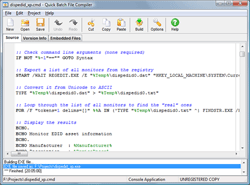
Quick Batch File Compiler

How to change file bat to exe ...?
Quick Batch File Compiler convert your batch files into actual program (.EXE format) in one click. This program may be run on Windows 2000/2003/XP/Vista without any limitations. An .EXE file is much harder to casually reverse-engineer, so this could be a way to conceal a particular batch file's operations from an end user. Content of your batch file will be encrypted and protected from changes.

Quick Batch File Compiler also lets you set various resources in the .EXE file, such as its description, the company name, version information and even the application icon. In additional, you may include any files to compiled exe file and use it during execution.


Main Features:
  • Save/Load Project Options 
  • Open context help for batch commands by pressing F1 in editor
  • Embedded files: you can embed files to the compiled executable. This files will be decompressed before script execution and delected on exit.
  • Can create Ghost applications without DOS window.
  • Allows you to select application icon
  • Allows you to edit Version Info for EXE-file.
  • Protects contents of a batch file from the non-authorized change
  • Hides contents of a batch file from viewing.
  • It is not necessary to be the programmer to create the program
  • It may be useful for installation and automation tasks
  • Highlight command's syntaxis inside built-in editor
  • Can compile any batch file to exe format compatible with 2000/XP/2003/Vista.
  • All compiled files royalty-free

Tuesday, March 1, 2011

Managing and Beautify Desktop With 360desktop

Without your awareness, display desktop on your computer can affect your mood and performance. Desktop look less attractive and interactive will not make you easily feel bored, and less enthusiastic in the work. In contrast, desktop look fresh and exciting can be a source of inspiration in your work.

If you want to make your desktop look more interesting, you should try the software 360Desktop. This software makes your desktop look more alive, and create more space on your desktop, so you can put whatever you want in there.

With 360Desktop, you also can easily retrieve the content from the web and put it on your desktop. 360Desktop not just change the desktop appearance, but also add various kinds of functions that are useful. 360Desktop software can be operated on a computer that uses Windows XP, Vista, and Windows 7 32bit and 64bit versions.

You can visit the official website at www.360Desktop.com 360Desktop software. There you can download this software free of charge. There are 2 versions 360Desktop that you can choose, which version of 32-bit and 64-bit versions. On this site you can also see a variety of desktop themes that you can use with 360Desktop on your computer. 360Desktop theme available in several categories, including Animals, Business, Fashion, News, People, Travel, and much more.

If you include people who like to be creative, you can create your own wallpaper for your 360Desktop. With 360Desktop, your desktop into an interactive canvas to pour all your creative ideas and content. You can easily combine a variety of content such as images, photographs, or your favorite online album.

How to Change the File Format Online

When working with a computer, we face various kinds of files. Sometimes, we need to change the format of a file to another format. For example, perhaps we need to change the file with. doc format to format. pdf. Indeed there are many software that can help us. But often the problem is when we need to change the format of a file quickly, but we do not have the software to change it, and we do not have much time to search for modifier software earlier.

We can change the format of a file simply by using only a web browser, now available online file format converter, namely Zamzar.com.
This website can help you convert various file formats like. doc,. pdf,. rtf,. txt,. ppt,. html,. docx, and many more. In addition to the document file, this website also can help us change the format for image files, such as bmp, gif, ico, png, and so forth. This website can even help us to change the format of video, audio, and type of compression.


Zamzar.com help us to do all the earlier file format conversion fast, easy, and free.

How to Search for Crack and Serial Number

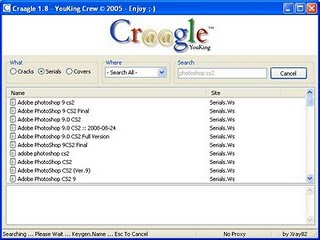
Craagle is search software crack, patch, keygen, and serial number.
Just by typing the name of the software and its version, it will appear the crack / serial for the software.
To trick was fairly easy and simple, just type the application name and version and select the type that will be in search eg Serial Number
This tool is small about 345 kb and without having to install it.
Download the application at the Warehouse Craagle


How to Lock File / Folder Without Application

Usually if we have a computer, there must be a document that you want people do not open or view it.
All we know is usually used the help of software to lock or secure the forder it.

Now want to lock or encrypt a folder no need to laboriously downloading software
our own make it ok., but remember not to be abused this trick ... ok.
Well how:
  • Make NEW TEXT DOCUMENT (Notepad)
  • Copy Paste Below Code in Notepad
    Spoiler View Script:

    @ECHO OFFtivad lock folder
    if EXIST "Control Panel.{21EC2020-3AEA-1069-A2DD-08002B30309D}" goto UNLOCK
    if NOT EXIST Locker goto MDLOCKER
    :CONFIRM
    echo Seriously want to lock ??(Y/N)
    set/p "cho=>"
    if %cho%==Y goto LOCK
    if %cho%==y goto LOCK
    if %cho%==n goto END
    if %cho%==N goto END
    echo Invalid choice.
    goto CONFIRM
    :LOCK
    ren Locker "Control Panel.{21EC2020-3AEA-1069-A2DD-08002B30309D}"
    attrib +h +s "Control panel.{21EC2020-3AEA-1069-A2DD-08002B30309D}"
    echo Folder locked
    goto End
    :UNLOCK
    echo Please enter your password
    set/p "pass=>"
    if NOT %pass%== tivadpasswordlock goto FAIL
    attrib -h -s "Control Panel.{21EC2020-3AEA-1069-A2DD-08002B30309D}"
    ren "Control Panel.{21EC2020-3AEA-1069-A2DD-08002B30309D}" Locker
    echo Folder Unlocked successfully
    goto End
    :FAIL
    echo Invalid password
    goto end
    :MDLOCKER
    md Locker
    echo Folder successfully created
    goto End
    :End

  • Then Save As with the extension. bat Example Locker.bat
  • Replace Typenya Being 
  • Ready-made script .. just stay open file is: Locker.bat and then Locker folder will appear
  • The next step just enter Folder / Files to Folder Locker earlier
  • Key stay .. I click the new file we created a distinguished Locker.bat.
    Then type the command Y>>> Enter (to lock)
  • And To Open Back Please Go Back Files Locker.bat that we created earlier and typing the Password tivadpasswordlock Then Enter>>> Folder Locker will open again
 You also can download files Locker.bat here

    Free.!! Collection Action For Photoshop

    This time I will discuss one way to work fast in Adobe Photoshop by using the Action palette. "Action is the pallet to record all our activities while working in Adobe Photoshop".

    With this palette you can save time, our thoughts and energy when doing editing in Adobe Photoshop. How it works just like a video camera, which is recording a movement starting from the record button pressed until the compression stop button, and replay Juka press the play button.
    So if you have items you want to put a similar effect, you can just click the play button is on the action palette, then Photoshop will work alone and produce the same effect with the effect that once you have a record.

    Well at this time I will give a collection action for photoshop that I have ..
    Please Download

    Extract the file and follow the instructions on how to use abyssal ..
    Ok .. hopefully useful

    Monday, February 28, 2011

    Free Download Screenshot Capture

    Screenshot Capture is a free software that serves to make capturing images from a computer easily and quickly.
    This software allows you to mencapturing images from a computer with several capture options like capture region, fixed region, selected regions, and full screen caputre.

    Here are some interesting features of Screenshot capture you can enjoy:
    1. Having a very efficient way to capture screenshots from your computer.
    2. Screenshots can be saved automatically in a folder
    3. Has 7 screenshot capture mode
    4. Each mode can be accessed via the system tray, configurable hotkeys or menu program.
    5. Has Post Capture Image Dialog
    6. Have the automatic version of the image file
    7. Having a high configurable screenshots
    8. Have a screenshot editing tool
    9. Screenshot capture can be easily linked to other external tools
    10. It has a slimline panel viewing sidebar
    11. Having Deluxe thumbnail maker
    12. Multi-monitor support
    13.  Having MoveTo and SendTo menu
    If you're Interested? Please Download Here

    Friday, February 25, 2011

    Cleaning Up at the Command Line

    Disk Cleanup offers some cool command-line switches that are documented only in a pair of obscure Knowledge Base articles. Through the use of these switches, you can save your preferences and rerun the cleanup process automatically using those settings. To do so, you need to use the following switches with Cleanmgr.exe :


    • /Sageset:n Opens a dialog box that allows you to select Disk Cleanup options, creates a registry key that corresponds to the number you entered, and then saves your settings in that key. Enter a number from 0 through 65535 in place of n.
    • /Sagerun:n Retrieves the saved settings for the number you enter in place of n and then runs Disk Cleanup without requiring any interaction on your part.
     To use these switches, follow these steps:
    • Open a Command Prompt window and type the command cleanmgr /sageset:200. (The number after the colon is completely arbitrary; you can choose any other number from 0 through 65535 if you prefer.) You must supply credentials from a member of the Administrators group to begin this task.
    • In the Disk Cleanup Settings dialog box, shown in Figure 21-11, choose the options you want to apply whenever you use these settings. (Note that the options in this dialog box are not the same as those shown in Figure 21-9.)
      Figure 21-11 When you use the /Sageset switch, you can work with an expanded set of options that are not available interactively.   

    • Click OK to save your changes in the registry.
    • Open Task Scheduler from Control Panel, and start the Create Basic Task wizard. Follow the wizard's prompts to name the task, and schedule it to run at regular intervals. When prompted to select the program you want Windows to run, enter cleanmgr.exe in the Program/Script box and enter /sagerun:200 in the Add Arguments box. 5.
    Repeat steps 1-4 for other Disk Cleanup options you want to automate.

    Running Disk Defragmenter from a Command Line

    The command-line version of Disk Defragmenter allows you to exercise fine-grained control over the defragmentation process and uses the exact same program code as the scheduled version. To use this command for a specific drive, type defrag d: in an elevated Command Prompt window, where d is the drive letter or mount point of an existing volume.To see the full range of the defrag utility's capabilities, type defrag /?.Among the more useful switches are the following:

    • -c Defragments all volumes on the computer; use this switch without specifying a specific drive letter or mount point.
    • -a Analyzes the specified volume and displays a summary of the analysis report.
    • -f Consolidates the free space on the specified volume, reducing the likelihood that large new files will be fragmented.
    • /r Defragments multiple volumes in parallel. If your volumes are on physically separate disks, you might save a bit of time by using this switch.
    • -v Displays complete (verbose) reports. When used in combination with -a, this switch displays only the analysis report. When used alone, it displays both the analysis and defragmentation reports.
    • -w Performs a full defragmentation by consolidating all file fragments, regardless of size
    In addition to the documented switches listed, the command-line Defrag utility includes this useful but undocumented switch:
    • -b The -b switch optimizes boot files and applications while leaving the rest of the drive undisturbed.

    Defragmenting Disks for Better Performance

    On a relatively new system with a speedy processor and plenty of physical memory, hard disk performance is the single biggest bottleneck in everyday operation. Even with a zippy hard disk, it takes time to load large data files into memory so that you can work with them. The problem is especially noticeable with movies, video clips, DVD-burning projects, databases, ISO image files, and virtual hard disks, which can easily take up multiple gigabytes, sometimes in a single file.


    On a freshly formatted disk, files load fairly quickly, but over time, performance can degrade because of disk fragmentation. To understand how fragmentation works, it helps to understand the basic structure of a hard disk. The process of formatting a disk divides it into sectors, each of which contains space for 512 bytes of data. The file system combines groups of sectors into clusters, which are the smallest units of space available for holding a single file or part of a file.

    On any NTFS volume greater than 2 GB in size, the cluster size is 4 KB. Thus, when you save a 200-MB video clip, Windows divides the file into roughly 50,000 pieces. When you save this file for the first time on a freshly formatted, completely empty hard disk, Windows writes it in contiguous clusters. Because all the clusters that hold individual pieces of the file are physically adjacent to one another, the mechanical components of the hard disk can work very efficiently, scooping up data in one smooth operation. As a bonus, the hard disk's onboard cache and the Windows disk cache are able to anticipate the need for data and fetch nearby clusters that are likely to contain other parts of the file, which can then be retrieved from fast cached memory rather than from the relatively slow disk.

    Unfortunately, hard disks don't stay neatly organized for long. When you add data to an existing file, the file system has to allocate more clusters for storage, typically in a different physical location on the disk. As you delete files, you create gaps in the once-tidy arrangement of contiguously stored files. As you save new files, especially large ones, the file system uses all these bits of free space, scattering the new files over the hard disk in many noncontiguous pieces. The resulting inefficiency in storage is called fragmentation; each time you open or save a file on a badly fragmented disk, disk performance suffers, sometimes dramatically, because the disk heads have to spend extra time moving from cluster to cluster before they can begin reading or writing data.

    The Disk Defragmenter in Windows 7 improves on earlier versions in many ways, not the least of which is you shouldn't need to do anything to benefit from it. Disk Defragmenter runs as a low-priority background task that kicks off once a week, in the middle of the night, without requiring any attention from you.

    Thursday, February 24, 2011

    Foxreal YouTube FLV Downloader Pro

    Foxreal YouTube FLV Downloader Pro 1.0.2.1 + Portable
    Foxreal YouTube FLV Downloader Pro 1.0.2.1 + Portable | 37.7 MB
     
    Foxreal YouTube FLV Downloader Pro - professional application that allows you to quickly download and Convert any Flash video (FLV/F4V) from sites such as YouTube, Google, Yahoo, Facebook, FOX, CBS, etc. and save video in MP4, 3GP, MPG, DVD, MOV, etc. With this program you can immediately store the video files on the iPad, iPhone 4, Droid X, Galaxy S, PSP, PS3, Apple TV to watch videos in high quality. In addition, the program supports UPnP connection, allowing you to stream music and video devices with UPnP.


    Key features:
    • Automatically detects and captures the URL of the video is played
    • Technology synchronize audio and video
    • Step by step instructions that teach the users of any level work with the program
    • Download and convert video simultaneously
    • Built-in library that allows you to sort out the files in the folder "video" and "music"
    • Integrated video player

    Homepage - YouTube Downloader - Foxreal YouTube FLV Downloader Pro, download FLV/F4V from YouTube

    Download Links:

    Hotfile.com: One click file hosting: FoxYTuD0wn1.0.2.1.rar
    or
    Download FoxYTuD0wn1.0.2.1.rar for free on Filesonic.com

    Pamela for Skype Professional Edition 4.7.0.71

    Pamela for Skype Professional Edition 4.7.0.71
    Pamela for Skype Professional Edition 4.7.0.71 | 10.5 Mb
    Pamela is a Skype certified plug-in or add-on software application that runs alongside Skype to enhance Skype with functions that make using Skype even more fun and effective. Features of Pamela Basic: Start Assistant to make configuration of options even more simple. Automatic program update function. Keep up to date with latest releases automatically! Full support of multi-user environments. Integrated crash reporter tool. Help us make Pamela even more stable and reliable! Option to play all Pamela recordings with the default Windows player instead of the built in player of Pamela. Pamela will save the name and time of the person that tried to contact you when you where in a call and Pamela sent auto reply. This so you can easily call them back when you finish your call.

    Highlights:
    • Intuitive, Skype compatible user interface
    • Record any type of Skype call
    • Record Skype Video and Chats
    • Local Skype answering machine
    • Video answering machine
    • Supports Skype Voicemail
    • Copy Skype Voicemails to local file
    • Birthday Notifications
    • Rich Mood Editor. Spice up your Skype Mood
    • Take notes during a call or add them later
    • Use the Emotion Sounds Player to play cool sounds during a call
    • Automatic call recording (In- Outbound or both)
    • Disable call recording warning
    • Automatic Skype chat reply while you are away
    • Supports natively MP3, WAV and OGG. Additionally any installed codec too
    • Skype Podcasting and Blogging
    • Much more...

    Home Page - http://www.pamela.biz/

    Download links:

    Hotfile.com: One click file hosting
    or
    Download pamela.for.skype.4.7.0.71-MPT.rar for free on Filesonic.com

    AI Roboform Enterprise 7.2.2 Final

    AI Roboform Enterprise 7.2.2 Final
    AI Roboform Enterprise 7.2.2 Final | 5.96 MB
    AI Roboform Pro - a program that is a password manager and web form filler that completely automates password entering and zapolnenie forms. With this program, users' personal data entered once and then any form on any site is filled with one click. Program supported by filling out forms in various languages.

    RoboForm can read and fill in any form, even the woman he has never seen before. Practically, this program does the same thing that people in completing forms - detects, processes and fills out the form below.

    Key features:
    • Automatic saving of the Internet passwords
    • AutoFill passwords to login form
    • Pressing the button Login for
    • Filling out forms with your personal information
    • varying remains classified information and notes
    • Generating random passwords
    • Encrypt passwords and personal data using AES, Blowfish, RC6, 3-DES or 1-DES
    • Storing all the information on your local computer
    • Work with USB-drive for ultimate portability
    • Sync your passwords and notes to Palm or Pocket PC
    • Provide backup and restore, print your passwords
    • Using advanced features
    • Work on Windows as a supplement to the browser
    • Work with browsers Internet Explorer, Netscape, Mozilla, Firefox

    Version 7.2.2
    * Chrome: speed up on pages with huge forms such as usairways.com.
    * Chrome: fix Auto-Submit on pages such as jetblue.com.
    * Firefox: if JS toolbar is shown, always show full toolbar on top of it.
    * Firefox: remove obsolete icons from browser context menu.
    * Fix integrity check of RoboForm, so that corrupted RoboForm DLL is detected.
    * RF Everywhere: increase max allowed interval between syncs from 7 days to 30 days.
    * IE: show lower toolbar on popup windows, such as login at anz.com.
    * ALT + click now forces non-modal AutoSave toolbar, not modal Auto-Save dialog.
    * Win32: fix crashes when integrating with SAP application.
    * Installer: fix does not automatically close processes when doing silent install.
    * Enterprise: make EXE and MSI installers more silent.
    * Enterpirse: fix bugs in MSI installer, when installed from group policy.
    * Import: add import of passcards from Norton Identity Safe CSV file.
    * Editor: allow pulling selection onto Identity summarry fields.
    * Editor: fix squares at the end of the lines.
    * Editor: fix clicking fingerprint icon shown Cannot load DLL message.

    Operating system: Windows ® XP/Vista/Seven
    Language: Multilanguage
    Released: 2011
    Medicine: Yes

    Download Links:

    cFosSpeed 6.50 Build 1810 Final Multilingual

    cFosSpeed 6.50 Build 1810 Final Multilingual
    cFosSpeed 6.50 Build 1810 Final Multilingual | 9.0 MB
    cFosSpeed is a network driver, which attaches itself to existing Internet connections. It then optimizes data transfer by means of Traffic Shaping. Traffic Shaping is a method for optimizing the Internet traffic. It allows maximum speed while ensuring minimal Ping. You can use cFosSpeed with a router and/or a DSL-modem or cable-modem. You can also use cFosSpeed with other types of Internet access, ie. whenever you already have an existing Internet connection. cFosSpeed supports a wide variety of connections, like DSL, cable, ISDN, UMTS, etc.

    Key features of "cFosSpeed":
    · Free configurable Prioritization
    · self-calibrating
    · Layer-7 Analysis
    · Firewall
    · automatic router detection
    · optimal Dial-Up connections
    · VPN - WLAN - WiFi - MTU-Optimization
    · Multi User Features
    · broadband limits

    OS: Win XP/2000/Vista/Win 7
    Language: Multilingual

    Download links:

    Ad Placement

    Intermezzo

    Travel

    Teknologi